Feature Focus: Sublayer Policies
Designed for scale, built for speed.

The Challenge
Teams working with large GIS sources, drone flights, or multi-layer survey data rely on the Map page to stay fast and responsive even as datasets grow more complex.
Until now, connecting a layer meant loading everything. That included historical drone flights, unused survey points, and sublayers you didn’t actually need - all of which slowed down Maps and made collaboration heavier than it should be.
Your Feedback
You told us layer connections needed to be more intentional and performance-friendly. In particular:
- Large datasets took too long to load
- You often only needed the most recent or specific sublayers
- There was no easy way to control what stayed in sync over time
The Update
We introduced Sublayer Policies, giving you precise control over what loads into your Map when you connect a layer.
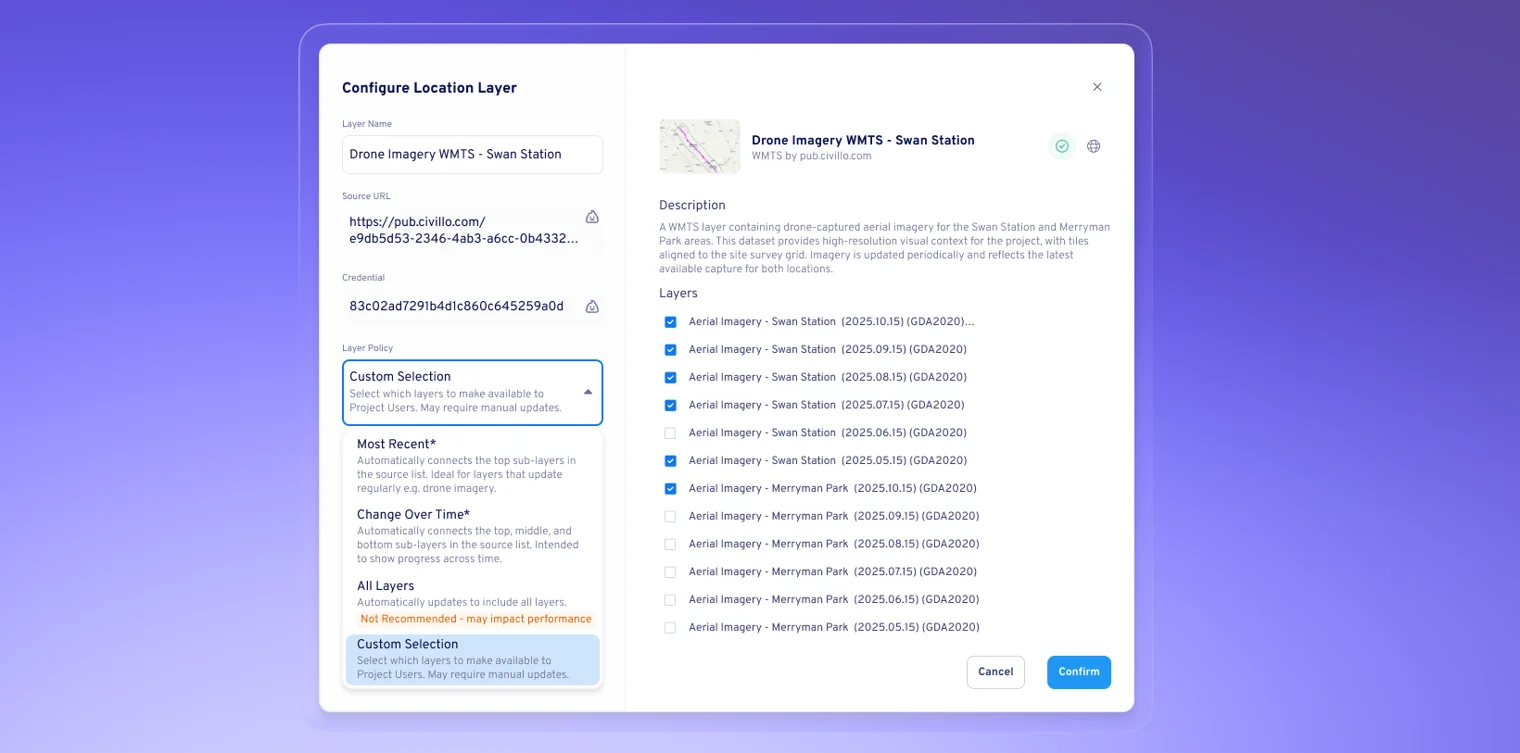
When Aphex detects available sublayers, you can now choose how they’re brought into your project using four simple policy types:
- All Layers – Bring in the full dataset and automatically connect to new sublayers
- Most Recent – Load only the latest 1, 2, or 3 sublayers
- Change Over Time – Include the newest, median, and oldest sublayers for comparison
- Custom Selection – Manually select exactly which sublayers you want to work with
Policies apply to both existing and future sublayers, and can be updated at any time.
Why You’ll Love It
By fetching only the layers you actually need:
- Maps load significantly faster
- Large datasets feel lighter and more responsive
- Teams avoid unnecessary data that slows down collaboration
Whether you’re reviewing a weekly drone flight, mapping utilities, or comparing survey data over time, Sublayer Policies help you keep your Map focused, intentional, and fast.
.png)